
AI Agents
Muse Wonder and Wonder Full: Access and Agent Workflows
Muse Wonder is a model family, while Muse and Muse Code are product surfaces. Start with the available access path, then test memory, task recovery, and media handoffs separately.
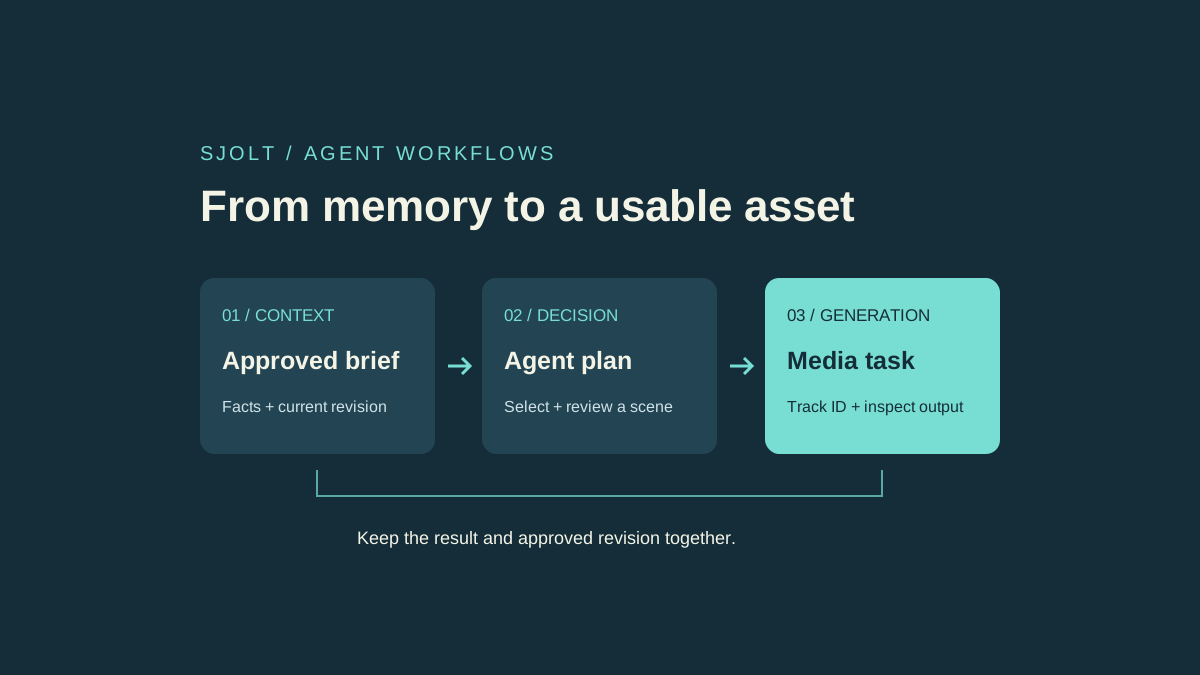
Meta introduced Muse Wonder and Muse Wonder Full on October 12, 2026. The useful first distinction is access: Wonder is offered through the Meta Model API and Muse Code, while the announcement makes Wonder Full available to Muse Code subscribers. It describes Wonder’s arrival in the Muse personal agent as an upcoming rollout, starting with subscribers.
This article covers the model release and how to evaluate it for a creative application. The existing dots versus Muse guide covers personal-agent workspace selection. SJolt’s catalog does not currently contain either Wonder model or a native Muse connector; the media handoff below is an architecture you can build with documented SJolt APIs.
Choose the model and the access surface explicitly
| Name | Role | Availability described by Meta |
|---|---|---|
| Muse Wonder | Model | Meta Model API and Muse Code |
| Muse Wonder Full | Model | Muse Code subscribers |
| Muse | Personal-agent product | Wonder-powered experiences announced as coming soon |
The public announcement does not establish an API route for Wonder Full. Before implementing a client, open the developer console for your account and check the exact model identifier, authentication, accepted request fields, rate limits, and pricing. A subscription selector is not enough evidence to invent an API model ID.
The linked Muse Code entry required login during this review, and the Meta API entry could not be retrieved through our public-page check. We therefore do not reproduce a speculative request body or token price. The official announcement and model card establish the release; account-specific API configuration still needs its own verification.
Separate understanding from media generation
Meta’s model card lists text, image, video, and audio input, text output, and a 1M-token inference context. Those are model-level specifications. A particular tool or product may expose only part of that capability, so check its upload and request contract.
For a campaign, this suggests a useful division of work: analyze the product photographs and approved specification, produce a grounded creative brief, and send an accepted shot description to a rendering service. Do not treat a model’s ability to understand an image as an image-generation endpoint.
Keep the deliverable narrow. Ask for a table containing the approved product fact, supporting source label, proposed visual treatment, and unresolved question. A reviewer can then approve the visual treatment without accidentally approving an invented product claim.
Test Active Memory and Active Focus as different behaviors
Meta uses Active Memory for retaining useful context and retrieving it when relevant. Active Focus describes continuing toward a difficult goal, adapting after failures, and seeking clarification or confirmation when needed. The research post discusses both as features of sustained agent work.
An announcement about memory does not specify your application’s durable storage contract. Until the chosen API documents persistence and retention, keep the authoritative brief, approved changes, and task state in your own application records. The model should be able to explain which saved revision informed its next action.
| Proposed test | Input change | Evidence to inspect |
|---|---|---|
| Relevant recall | Provide a brand rule, then several unrelated tasks | The rule reappears only when it applies |
| Correction handling | Replace an earlier product dimension | The new value is used and the old one is retired |
| Failure recovery | Return a fixture stating one reference is unavailable | The agent revises the plan or asks for a replacement |
| Completion reporting | Provide a running media-task fixture | The agent reports running, with no invented output URL |
Run these as application tests with saved fixtures first. You can inspect the state transitions without spending money on image or video generation. Repeat with the same source packet when you evaluate the real model, then record both successful and failed cases. No Wonder evaluation was executed for this article.
Build one reviewable handoff to SJolt
Consider an original ceramic table lamp campaign. Your application stores the approved dimensions and colors, a reference photo, and a request for three backgrounds. Let Wonder propose the scenes. A human selects one before the application constructs the generation request.
- Save the brief revision and selected scene as a durable record.
- Choose a current SJolt model and validate the fields against that model’s route.
- For a reference-guided still, use Nano Banana 2.1 image-edit with the approved image URLs and an explicit prompt.
- Save data.task_id from the accepted creation response and query that task.
- Present output links for review only after the task succeeds.
SJolt’s documented media states are 0 for running, 1 for success, and 2 for failure. Keep your orchestration state consistent with those results. Store the accepted task ID before reconnecting a user interface, so a page refresh can resume status checks without automatically creating another paid generation.
Keep credentials on the server and pass the agent a small, structured result: task ID, state, and accepted output URLs. A failed task can return a reason and a proposed correction for review. This gives the agent enough information to continue the assignment while leaving billing and execution decisions in the application.
Read benchmark claims in the context of the harness
Meta’s model card reports model settings and benchmark-specific methods. It distinguishes controlled internal coding comparisons from external results that retain another agent product or harness. It also identifies MemoryBench and FocusBench as internal evaluations. These details matter when translating a chart into a purchasing or integration decision.
For your own trial, keep the source packet, allowed tools, and completion criteria fixed. Count factual corrections, successful recovery from the missing-reference fixture, duplicate generation attempts, and time spent by the reviewer. Save enough of the execution record to reproduce a failure.
Choose the access surface that can perform the work you need today. If the API is essential, validate Wonder in that route. If you evaluate Wonder Full in Muse Code, label the result as an agent-product evaluation. A model name alone does not make two differently configured workflows comparable.
Sources & further reading
Take the next idea into production.
Explore the models, test a workflow in the playground, and use the same request in your application.